Free planning poker for Jira Cloud
Last updated: .
Pointwalk is free planning poker that works with Jira Cloud. The host connects Jira once, pulls in the issues to estimate by board, sprint or JQL, and the team votes in private. When the team agrees, Pointwalk writes the story points back to each Jira issue, with the vote breakdown posted as a comment if you want it. Players don't need a Jira licence or a Pointwalk account. They join with a six-letter code.
This guide walks through the whole flow, what Pointwalk can and can't do in your Jira site, and how to fix the most common problems.
What you need
- A Jira Cloud site (yourcompany.atlassian.net). Jira Server and Data Center aren't supported.
- An Atlassian account that can see the issues and edit them, if you want estimates written back.
- A board. Writing estimates back uses the board's estimation settings, so pick the board your team plans from.
No Jira? You can still host a free session and type ticket numbers and titles in by hand. The summary email keeps the results.
1. Start a session and connect Jira
Go to Host a free session and enter your name, a session name and your email (that's where the summary goes). Choose Jira as the ticket source and select Continue.
On the tickets step, select Connect Jira Cloud. You'll go to Atlassian to approve access, then come straight back. If your Atlassian account can reach more than one Jira site, Pointwalk asks which one to use.
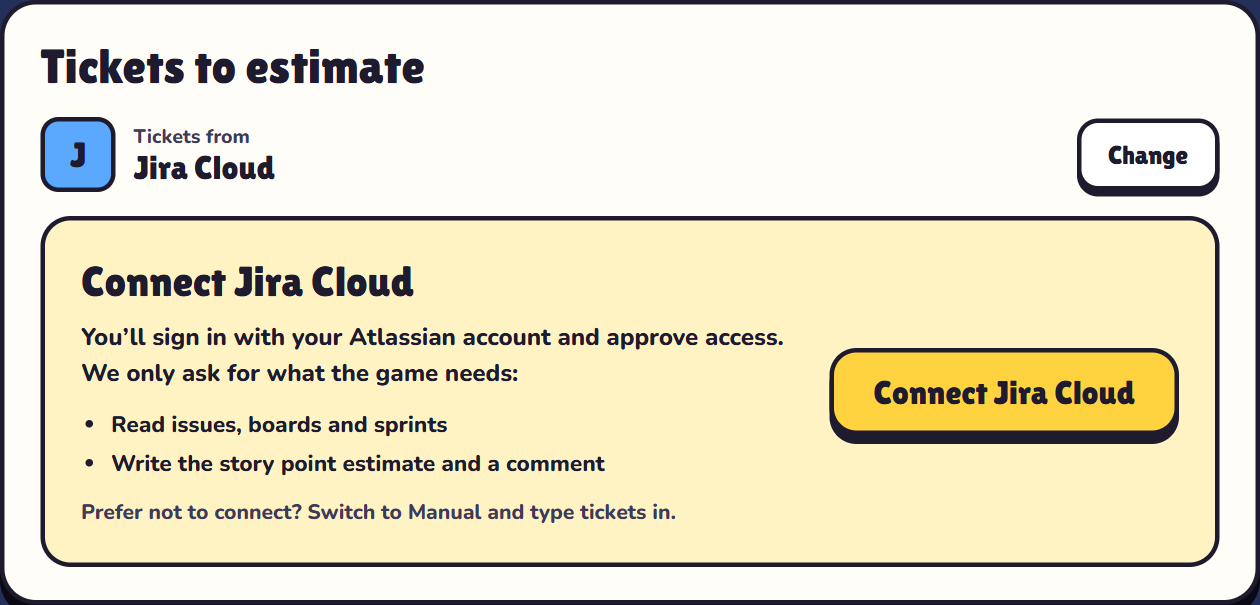
2. Pull issues by board, sprint or JQL
Once connected, pick a board and a sprint. Pointwalk fills in a JQL filter for you, so you usually just select Load issues:
| You pick | JQL Pointwalk uses |
|---|---|
| The active sprint | sprint in openSprints() AND "Story point estimate" is EMPTY |
| A future sprint | sprint = 123 AND "Story point estimate" is EMPTY |
| Backlog | sprint is EMPTY AND statusCategory != Done |
The field name matches your board's estimation field, which might be "Story point estimate" or "Story Points". You can edit the JQL freely to load exactly what you want, for example project = ATLAS AND labels = refinement. If Jira rejects the query, its error message shows under the field.
Tick the issues you want to estimate (up to 100 per session) and drag to reorder them. The current estimate, if any, shows next to each issue.
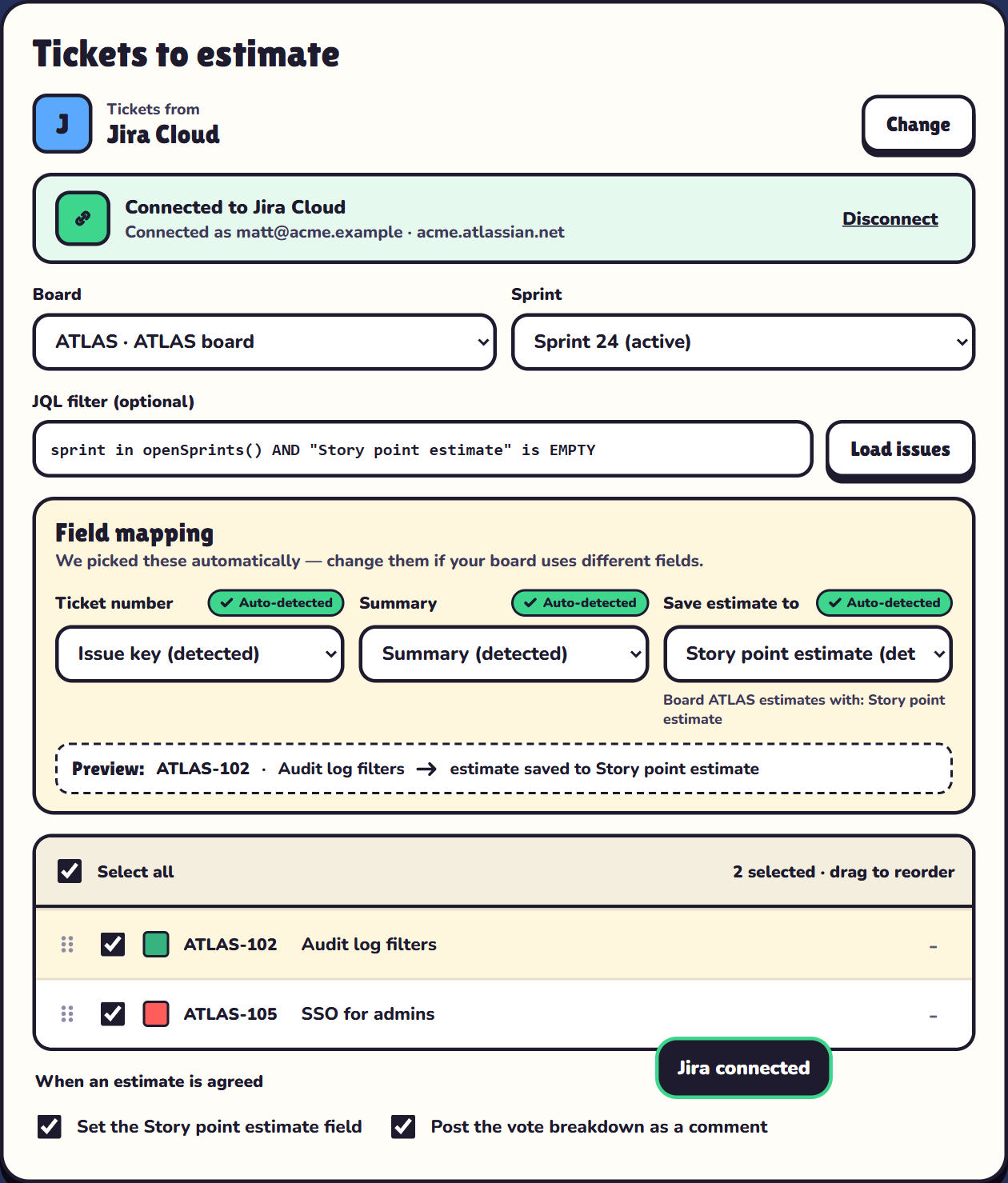
3. Check the field mapping
Pointwalk detects which Jira fields hold the ticket number, the summary and the estimate, and shows them as pre-selected options. Most teams don't need to change anything. If your board stores estimates in a custom field, pick it under Save estimate to. The preview line shows exactly which field will be updated. To keep estimates out of Jira entirely, choose Keep estimates in the summary only.
4. Choose what happens when an estimate is agreed
- Set the story point field. Pointwalk writes the agreed number to the issue through Jira's board estimation API, the same way Jira does when you edit the estimate on the board.
- Post the vote breakdown as a comment. Pointwalk adds a short comment to the issue with the agreed estimate and who voted what, so the reasoning isn't lost.
T-shirt sizes can't be stored in a number field, so with the T-shirt deck the results go in your summary email instead of Jira. Fibonacci and modified Fibonacci estimates are written back.
5. Play, reveal, and watch it sync
Pick a world, create the room and share the six-letter code. Each ticket becomes a round: players walk to their estimate in secret, you reveal, and everyone's walk replays at once. When the team agrees, the estimate is written to Jira straight away, and each ticket shows whether it saved. Made a mistake? Undo within 10 seconds and Pointwalk puts the previous value back in Jira.
At the end, the host gets a summary email with every ticket, its agreed estimate, the vote spread and whether it reached Jira. That email is your record: session data is deleted when you finish, or 24 hours after the session ends.
Permissions and privacy
- Pointwalk uses Atlassian's standard OAuth sign-in. It never sees your Atlassian password.
- It reads only the boards, sprints and issues you load, and writes only the estimate field and the optional comment.
- Jira access tokens are encrypted and deleted with the session. You can also revoke access any time from your Atlassian account settings.
- Players never connect to Jira. They only see the ticket key and title the host loaded.
More detail is in our privacy policy.
Troubleshooting
- "This board doesn't use sprints." Kanban boards have no sprints. Use the Backlog option or write your own JQL.
- "Choose a board so we know which estimate field to update." Writing back needs a board. Pick one, or switch to summary-only.
- An estimate didn't save. The usual cause is that your account can't edit that issue, or the estimate field isn't on the issue's screen. The ticket shows the failure, and the estimate is still in your summary email.
- "Jira disconnected." Atlassian access expired or was revoked. Reconnect in setup. Estimates already agreed are kept in your summary.
New to planning poker? Read what planning poker is and how to run it. Comparing tools? See the best free planning poker tools for Jira teams.
Questions
Is Pointwalk's Jira integration free?
Yes. Connecting Jira Cloud, loading issues by board, sprint or JQL, and writing story points back are all included in the free plan.
Does Pointwalk work with Jira Server or Data Center?
No. Pointwalk works with Jira Cloud only. Teams on Jira Server or Data Center can type ticket numbers and titles in manually and copy the estimates from the summary email.
Do players need Jira accounts?
No. Only the host connects Jira. Players join with a six-letter code and a name from any browser and never sign in to Jira or Pointwalk.
Which Jira field does Pointwalk update?
The estimation field your board uses, usually Story point estimate or Story Points. Pointwalk detects it automatically, and you can choose a different field in the field mapping.
Can I undo an estimate written to Jira?
Yes. Undo within 10 seconds of agreeing an estimate and Pointwalk restores the previous value in Jira, or clears the field if it was empty.
Does Pointwalk need a Jira admin to install anything?
No. There's no Marketplace app to install. The host signs in with their own Atlassian account and approves access for the session.